Mobile proxies for multi-account setups are often recommended as the safest option. That advice is dangerously incomplete. They can be safer, but only when they behave like real mobile users. Used incorrectly, mobile proxies fail just as fast as residential or datacenter options.
This guide explains what actually makes mobile proxies work for multi-account operators, the specific mistakes that get accounts flagged, and how to configure them correctly at scale. Written for operators managing 10+ accounts, not beginners.
“Use mobile proxies. They’re safer.”
Why Platforms Trust Mobile IPs More (The Real Reason)
Platforms don’t “trust” mobile proxies because they are mobile.
They trust them because mobile networks behave differently.
What makes mobile IPs inherently stronger
- Real users share carrier networks
- IP changes are normal on mobile
- NAT behavior is expected
- Session drops happen organically
From a platform’s perspective, mobile traffic:
- Is noisy
- Is inconsistent
- Looks human
This gives mobile IPs higher tolerance — if used correctly.
Carrier IP Trust & ASN Reputation (Most Important Factor)
Not all mobile proxies are equal.
The carrier ASN matters more than the country or city.
A strong mobile proxy comes from:
- Recognized mobile carriers
- Clean ASN ranges
- Networks associated with real subscribers
A weak one comes from:
- Overused “mobile-labeled” pools
- Mixed residential/mobile ASNs
- IPs recycled across too many users
For more details, see our guide on IPv4 vs IPv6 proxies for multi-account users.
Reality check:
If your provider cannot tell you which carrier ASN your IPs come from, that’s already a red flag.
Sticky vs Rotating Mobile Proxies (This Is Where Most Fail)
This is the most misunderstood part.
Sticky (session-based) mobile IPs
- Same IP stays active for a defined session
- You decide when to rotate
- Best for:
- Logins
- Account warm-up
- Long sessions
- Best for:
Rotating mobile IPs
- IP changes automatically
- Often time-based
- Useful only for:
- Scraping
- One-off actions
- Useful only for:
For multi-account usage, rotating mobile IPs are often more dangerous than helpful.
Why?
Humans don’t:
- Change IPs every few minutes
- Switch carriers mid-session
- Appear in multiple locations rapidly
Stability builds trust.
Chaos breaks it.
Session Length vs Platform Behavior
Different platforms tolerate different session patterns.
General rule
Match session behavior to how real users behave on that platform.
Examples:
- Long logins → need sticky sessions
- Frequent short checks → controlled rotation between sessions
- Automation → consistent IP + fingerprint per account
Over-rotating breaks identity continuity.
Why Mobile Proxies Still Fail for Some Users
If mobile proxies are “safer”, why do people still get banned?
Because mobile IP ≠ identity isolation.
Common failure points:
1. One IP, multiple accounts
Even on mobile, sharing IPs across accounts creates correlation risk.
Mobile ≠ invisible.
2. Fingerprint mismatch
Using one browser profile with multiple accounts defeats the purpose.
Platforms correlate:
- IP
- Browser fingerprint
- Behavior
Proxy only covers one layer.
3. Forced rotation
Some providers rotate IPs:
- Without control
- Mid-session
- Across users
That randomness looks unnatural.
Mobile Proxy vs Residential vs Datacenter (For Multi-Account Use)
Here’s the honest comparison:
| Type | Trust Level | Stability | Multi-Account Safety |
|---|---|---|---|
| Datacenter | Low | High | ❌ Poor |
| Residential | Medium | Medium | ⚠️ Mixed |
| Mobile | High | High (if sticky) | ✅ Best |
Datacenter proxies fail because:
- ASN reputation is poor
- IPs are clearly non-human
Residential proxies fail when:
- IPs are recycled
- Networks don’t behave like real users
Mobile proxies win when session control exists.
The Correct Way to Use Mobile Proxies for Multi-Account
The safest baseline setup:
- 1 account
- 1 browser profile
- 1 mobile IP (sticky session)
Each account represents:
- One device
- One network identity
- One behavior pattern
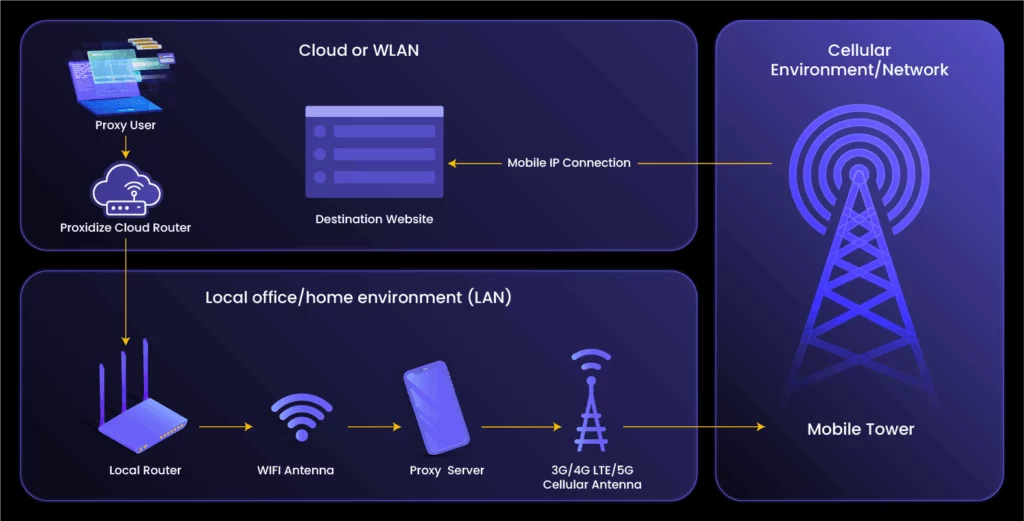
This is why mobile proxies work best with anti-detect browsers, not alone.
Platform Notes (High-Level)
Behavior differs slightly across platforms like
Facebook, TikTok, and Instagram,
but the core principle remains the same:
Consistency beats randomness.
Mobile IPs increase tolerance — they don’t remove rules.
What to Look for in a Mobile Proxy Provider (Critical)
Before choosing a provider, ask:
- Are these real carrier-grade mobile IPs?
- Can I control session stickiness?
- Are IPs isolated per customer?
- Is forced rotation optional or mandatory?
- Can I scale without IP reuse?
If answers are vague, move on.
We built our mobile proxy infrastructure specifically for multi-account operators:
- Carrier-grade mobile IPs
- Session-based stickiness you control
- No forced IP sharing
- Designed for long-term account usage
👉 View Mobile Proxy Specs
Specs first.
No hype.
Who Mobile Proxies Are (And Aren’t) For
Mobile proxies are ideal if:
- You manage accounts long-term
- You care about survival over speed
- You isolate browser profiles
- You scale gradually
They are NOT ideal if:
- You churn throwaway accounts
- You scrape aggressively with logins
- You rotate IPs constantly
- You expect zero risk
Final Takeaway
Mobile proxies work for multi-account users not because they’re magical, but because:
- Carrier networks behave like real users
- Platforms expect instability — within reason
- Trust builds through consistent identity
Used correctly, mobile proxies offer the highest tolerance window available today.
Used incorrectly, they fail just like everything else.