Most multi-account setups fail because the proxy and anti-detect browser are configured separately, not as one identity. Proxies alone won’t stop bans. Mobile IPs help but aren’t enough. Accounts still get flagged when your signals don’t line up. The fix isn’t a better proxy or a new browser profile. It’s the workflow that ties them together. This guide explains the correct anti-detect browser proxy setup for running multiple accounts safely. Not as a trick, but as a way to build consistent identities that platforms recognize and tolerate. For more details, see our guide on how websites detect proxies and fingerprint your browser.
anti-detect browsers and proxies only work when configured together as a single identity. each account needs one browser profile locked to one proxy, with timezone, language, and WebGL matching the IP location. mismatched signals are what trigger bans, not the proxy itself.
- Proxies alone don’t stop bans
- Mobile IPs help, but aren’t magic
- Accounts still get flagged when signals don’t align
The Core Mistake Most People Make
Most users think in tools:
“I use a proxy.”
“I use an anti-detect browser.”
Platforms don’t see tools.
They see identities.
When tools aren’t connected correctly, you get:
- Stable IP + unstable device
- Stable device + unstable IP
- Or both unstable at once
That’s when bans happen.
The Correct Mental Model (Important)
Stop thinking:
Proxy = protection
Start thinking:
Identity = protection
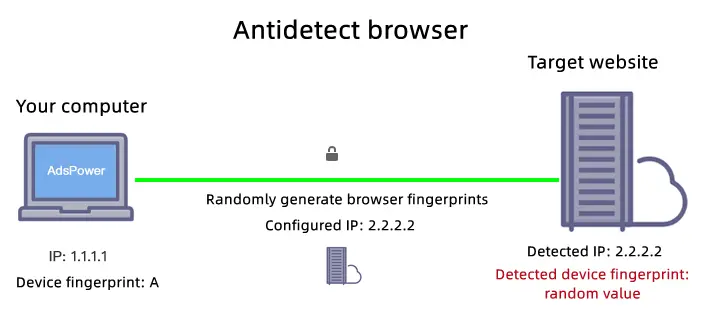
An identity is made of three layers:
- Network layer → IP address (proxy)
- Device layer → browser fingerprint (anti-detect profile) — anti-detect browsers build on the Chromium open source engine and override these signals at the API level
- behavior layer — FingerprintJS research shows behavioral signals are increasingly weighted in modern platform detection → how actions happen over time
If any layer contradicts the others, trust drops.
What Anti-Detect Browsers Actually Do (Plain English)
Anti-detect browsers don’t “hide” you.
They separate identities.
Each browser profile:
- Has its own fingerprint
For more details, see our guide on browser fingerprinting and how platforms track you.
- Stores its own cookies
For more details, see our guide on cookie isolation and session management for multi-account use.
- Keeps its own device signals
Tools like:
- Multilogin
For more details, see our guide on setting up mobile proxies in Multilogin.
- GoLogin
For more details, see our guide on setting up mobile proxies in GoLogin.
- AdsPower
For more details, see our guide on configuring mobile proxies in AdsPower.If you manage OnlyFans creator accounts, see our platform-specific setup guides: Dolphin Anty for OnlyFans, GoLogin for OnlyFans, and our anti-detect browser comparison for OnlyFans agencies.
exist for one reason:
One browser profile = one real device
Without this separation, accounts get linked — regardless of proxies.
The Correct Proxy + Browser Workflow (Baseline)
Here is the safest baseline setup for multi-account use:
- 1 account
- 1 anti-detect browser profile
- 1 mobile proxy (sticky / session-based)
Each account gets:
- Its own device identity
- Its own network identity
- Its own behavior pattern

This is not overkill.
This is how real users look at scale.
Step-by-Step: The Correct Setup Flow
Step 1 — Create a Browser Profile Per Account
- One profile = one account
- Never reuse profiles
- Do not clone fingerprints unnecessarily
Treat profiles like physical devices.
Step 2 — Assign One Mobile Proxy to That Profile
- Use a session-based (sticky) mobile IP
- Keep the IP stable during login and activity
- Rotate only between sessions, not mid-session
This mirrors real mobile behavior.
See how to maintain proper session behavior here
Step 3 — Align Timezone, Language, and Location
- IP country ↔ timezone
- Browser language ↔ location
- Avoid constant region switching
Consistency matters more than perfection.
Step 4 — Keep Behavior Unsynchronized
Avoid:
- Logging into multiple accounts back-to-back
- Performing identical actions at the same time
- Running automation in lockstep
Platforms flag patterns, not tools.
Why This Workflow Works (From the Platform’s View)
From the platform’s perspective, each account:
- Looks like one device
- Comes from one network
- Behaves like one user
Even if IPs rotate over days or weeks, the identity remains coherent.
This dramatically reduces:
- Account linking
- Random checkpoints
For more details, see our guide on our complete proxy testing checklist.
Common Workflow Mistakes (That Kill Accounts)
❌ One proxy, many profiles
This links identities at the network layer.
❌ One profile, many accounts
This links identities at the device layer.
❌ Forced IP rotation
Rotation without control breaks session trust.
❌ “More random = safer” thinking
Randomness increases entropy and suspicion.
Platforms expect stable randomness, not chaos.
Mobile Proxies + Anti-Detect = Best Pairing (When Done Right)
Why mobile proxies work best in this workflow:
- Carrier networks are trusted
- IP changes are expected
- NAT behavior is normal
But only when:
- Sessions stay stable
- Profiles stay isolated
- Behavior stays human
Mobile proxies increase tolerance — they don’t replace identity logic.
Scaling This Workflow (Without Burning Accounts)
Scaling is simple conceptually, but strict in execution:
- Each new account = new profile + new proxy
For more details, see our guide on account warming with mobile proxies.For OnlyFans agencies scaling past 10 accounts, see scaling OnlyFans agency proxy infrastructure and what your agency should actually budget for proxies.
- Increase IP pool before adding accounts
- Monitor patterns before platforms do
If you can’t explain:
“Which identity caused the issue?”
You’re scaling too fast.
Choosing Proxies for This Workflow (Critical)
For proxy + anti-detect setups, your provider must support:
- Real carrier-grade mobile IPs
- Session-based stickiness you control
- No forced IP sharing across customers
- Clean integration with browser profiles
We designed our mobile proxy infrastructure specifically for this workflow:
- Stable mobile sessions
- Carrier-grade networks
- No forced IP reuse
- Built for identity isolation
👉 View Mobile Proxy Specs
Specs first.
Always.
Who This Workflow Is (And Isn’t) For
This workflow is for you if:
- You value account longevity
- You run multiple accounts seriously
- You prefer predictability over shortcuts
It’s not for you if:
- You churn throwaway accounts
- You expect zero effort
- You want “one-click” scaling
Identity consistency requires discipline.
Final Takeaway
Accounts don’t survive because of:
- Better tools
- More proxies
- More randomness
They survive because:
One account = one identity
When:
- Browser fingerprint
- Network behavior
- User actions
tell the same story, platforms have no reason to interfere.
That’s the entire game.
Mobile Anti-Detect Workflows
This guide covers desktop anti-detect browser workflows. For mobile-first platforms that require native mobile activity, the workflow is similar but uses dedicated mobile apps. See our guide on anti-detect mobile browsers for the best tools and setup instructions for managing accounts from Android and iOS devices.
sources and further reading
- Chromium project — the open source engine most anti-detect browsers fork from
- FingerprintJS research blog — how fingerprint spoofing works and where it fails
- Chrome privacy and security docs — browser signal exposure by layer
- SOCKS5 RFC 1928 — proxy protocol used in most anti-detect browser integrations