Your proxy setup for multiple accounts is failing for reasons most guides never cover. Rotating IPs alone won’t protect profiles across Facebook, TikTok, Instagram, or marketplaces. This guide breaks down the real configuration mistakes that trigger bans and shows you exactly what to fix before you scale. This is not a beginner article. It’s for operators who run accounts and need them to stay alive.
Rotating IPs alone will not keep your accounts alive. platforms judge identity consistency across IP, browser fingerprint, and behavior simultaneously. you need one dedicated proxy, one isolated browser profile, and stable signals per account — every time.
- You already use proxies, but accounts still get restricted
- You’re scaling and want to avoid burning accounts
- You’re tired of contradictory advice and trial-and-error
The Biggest Misconception in Multi-Account Setup
Most people believe:
“If I use a proxy, my accounts are safe.”
That belief is the #1 reason accounts get banned.
For more details, see our guide on how websites detect proxies.
Platforms don’t judge just IP addresses.
They judge identity consistency over time — a concept well-documented in FingerprintJS’s research on browser signals.
To understand this, you must clearly separate three different layers, each tracked separately by platforms according to Chrome’s privacy documentation.
IP ≠ Account ≠ Browser Profile (This Matters More Than Proxies)
These three are often mixed up, but platforms treat them very differently.
- Account
Your Facebook, TikTok, Instagram, marketplace, or SaaS login.
- Account
- IP address
The network location your traffic comes from.
- IP address
- Browser profile (fingerprint)
Your device identity: OS, browser version, screen size, timezone, language, WebGL, canvas, fonts, and entropy signals.
- Browser profile (fingerprint)
Most bans happen when these three don’t stay aligned.

Example of a broken setup
- Account A logs in today
- Same browser profile reused for Account B tomorrow
- IP rotates mid-session
- Timezone and language don’t match the IP
Even with “good proxies”, this looks abnormal.
Important:
For multi-account work, the behavior of the IP matters more than the IP itself.
Why Accounts Still Get Banned Even When Using Proxies
Using a proxy does not automatically make activity look human or legitimate.
Here are the real reasons bans still happen.
1. Shared IPs Across Accounts
When multiple accounts share the same IP, correlation risk increases.
If one account triggers a flag, every account on that IP inherits risk.
This is why “unlimited” or heavily shared proxies quietly fail at scale.
For more details, see our guide on automating multi-account proxy workflows with scripts.
2. Wrong IP Rotation Timing
For more details, see our guide on proxy rotation strategies and timing patterns.
Rotation becomes a problem when it’s:
- Too frequent
- Happening mid-session
- Not aligned with login behavior
Humans don’t change networks every few minutes.
Stability > randomness.
3. Browser Fingerprint Reuse
Reusing the same browser profile across accounts is one of the fastest ways to get linked.
For more details, see our guide on our complete proxy testing checklist.
Platforms fingerprint:
- Hardware traits
- Software traits
- Behavioral patterns
A proxy does not isolate fingerprints.
4. Location & Timezone Inconsistencies
Examples that trigger flags:
- US IP + Asia timezone
- EU IP + mismatched language
- City hopping without session logic
These inconsistencies are easy for automated systems to detect.
For more details, see our guide on integrating proxy APIs for automated IP changes.
The Correct Proxy Setup Logic for Multi-Account Users
A safe multi-account setup follows one simple rule:
One consistent identity per account
That identity consists of:
- One IP
- One browser fingerprint
- One behavioral pattern
The safest baseline setup
- 1 account
- 1 browser profile
- 1 sticky / session-based IP
This doesn’t limit scaling.
It makes scaling predictable.
Where Most Multi-Account Users Screw Up
Being blunt here saves accounts.
❌ Buying “cheap” mobile proxies
Cheap usually means:
- Reused IP history
- Overloaded ASN ranges
- Unknown rotation rules
They may work briefly, then collapse.
❌ Over-rotating IPs
More rotation ≠ safer.
Over-rotation:
- Breaks session trust
- Creates unstable identity signals
Platforms reward consistency.
Sticky vs Rotating Proxies Explanation
❌ Ignoring automation patterns
Automation is detected less by tools, and more by behavior:
- Login timing
- Action speed
- Repetitive sequences
Your proxy setup must support human-like continuity.
What Actually Matters When Choosing Mobile Proxies (For Multi-Account Use)
Instead of asking “what’s the cheapest?”, ask these:
1. IP Trust & ASN Reputation
- Are IPs coming from real mobile carriers?
- Are they part of trusted ASN ranges?
2. Session Control
- Can you keep the same IP per session?
- Can you decide when rotation happens?
3. Isolation
- Are IPs reused across customers?
- Can risk from other users affect you?
4. Location Consistency
- Country, timezone, language alignment
Quick reality check:
If a provider can’t clearly explain these points, you’re not buying mobile proxies — you’re buying uncertainty.
Proxy Alone Is Not Enough (Critical for Multi-Account)
Here’s the hard truth:
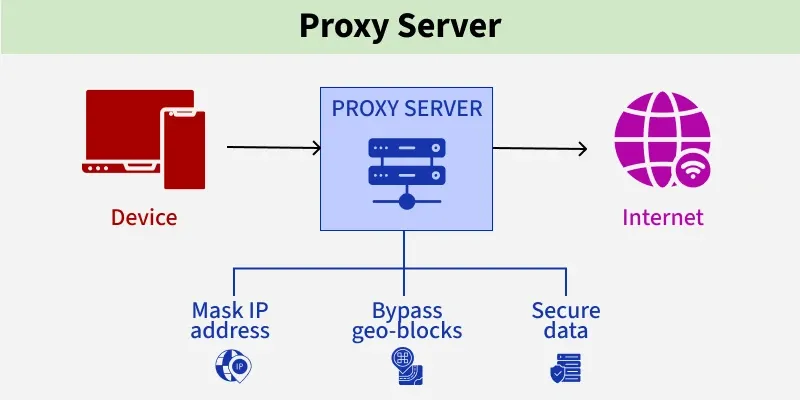
Proxy = network layer
Fingerprint = device layer
Platforms correlate both.
This is why experienced operators pair proxies with anti-detect browsers like:
- Multilogin
For more details, see our guide on setting up mobile proxies in Multilogin.
- GoLogin
For more details, see our guide on setting up mobile proxies in GoLogin.
- AdsPower
For more details, see our guide on configuring mobile proxies in AdsPower.
Not as “extra tools”, but as identity containers.
Each browser profile:
- Has its own fingerprint
- Gets its own proxy
- Behaves like one real device
This is how multi-account setups survive long-term.
How to Think About Scaling Without Burning Accounts
Scaling is not about adding accounts quickly.
It’s about adding identities cleanly.
A safe scaling approach:
- Start with strict 1:1 setups
- Observe platform limits
- Add accounts gradually
- Expand IP pool before bans occur
If you can’t explain why an account survives, the setup isn’t ready to scale.
What to Look for in a Mobile Proxy Provider (Operator Checklist)
Before choosing or switching providers, make sure they can answer:
- Do you offer real carrier-grade mobile IPs?
- Can I control sticky sessions?
- Are IPs isolated per customer?
- Can I scale without forced IP reuse?
If these answers are vague, that’s your signal.
We designed our mobile proxy infrastructure specifically for multi-account operators:
- Carrier-grade mobile IPs
- Session-based stickiness you control
- No forced IP sharing
- Built for Facebook, TikTok, Instagram, and marketplace workflows
👉 View Mobile Proxy Specs
No hype.
Specs first.
Who This Setup Is For (And Not For)
This setup is for you if:
- You manage multiple accounts long-term
- Account survival matters more than cheapest pricing
- You use isolated browser profiles
This setup is NOT for you if:
- You churn throwaway accounts
- You rotate IPs every few minutes
- You only optimize for cost per GB
Clarity saves both sides time.
Final Thoughts
Multi-account success isn’t about tricks.
It’s about identity consistency:
- Network
- Device
- Behavior
When these align naturally, platforms have no reason to intervene.
Get the foundation right, and scaling becomes predictable — not stressful.
sources and further reading
- FingerprintJS research blog — browser fingerprinting techniques used by platforms
- Chrome privacy and security docs — understanding browser signal exposure
- SOCKS5 RFC 1928 — proxy protocol specification
- Meta marketing API overview — platform policies for ad account management
- Electronic Frontier Foundation — privacy and identity context for browser tracking